 LowestCode
Green AI Office and Business Application
by
One AI system, designed to replace
Microsoft Office, Microsoft Dynamics, Adobe, SAP and more.
One AI Workspace for Office & Business
With AI App Development Built In
In production since 2024 at an international insurance group: certified, due-diligence approved, and backed by the labor union. In the Quest, October to December 2026, one AI agent guided by one human creates an Office and Business App, with monthly, public, verifiable proof.
-
 LowestCode at a glance: twenty pictures in one
-
 LowestCode Unified Development System:
Coding, project management, testing 100 % by AI & LCP -
 Energy and server hardware per 1,000 users
-
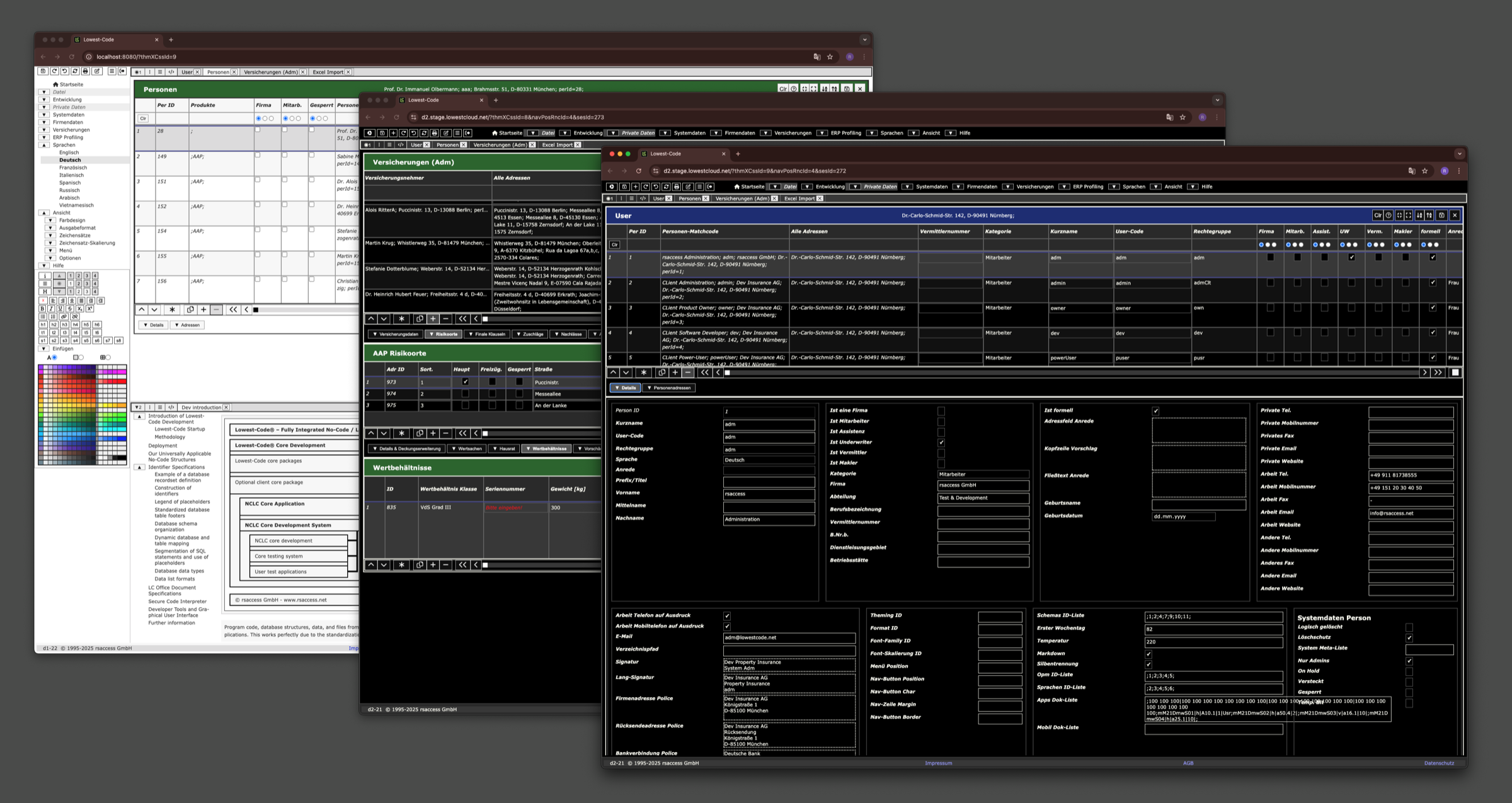 The workplace: several windows of one system side by side, in three themes
-
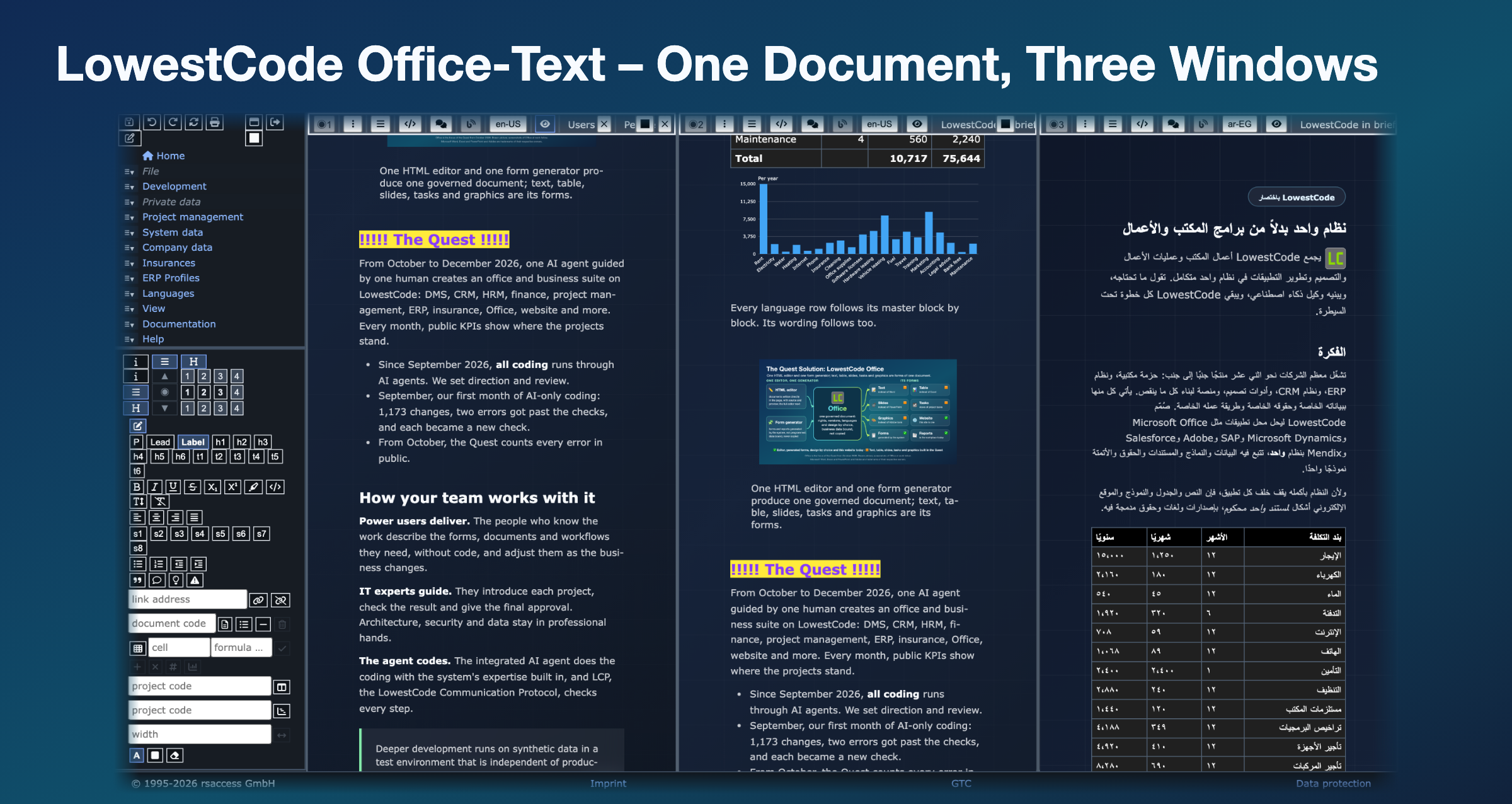 LowestCode Office-Text at work: one document in three windows, each scrolled on its own, built for full RPA
-
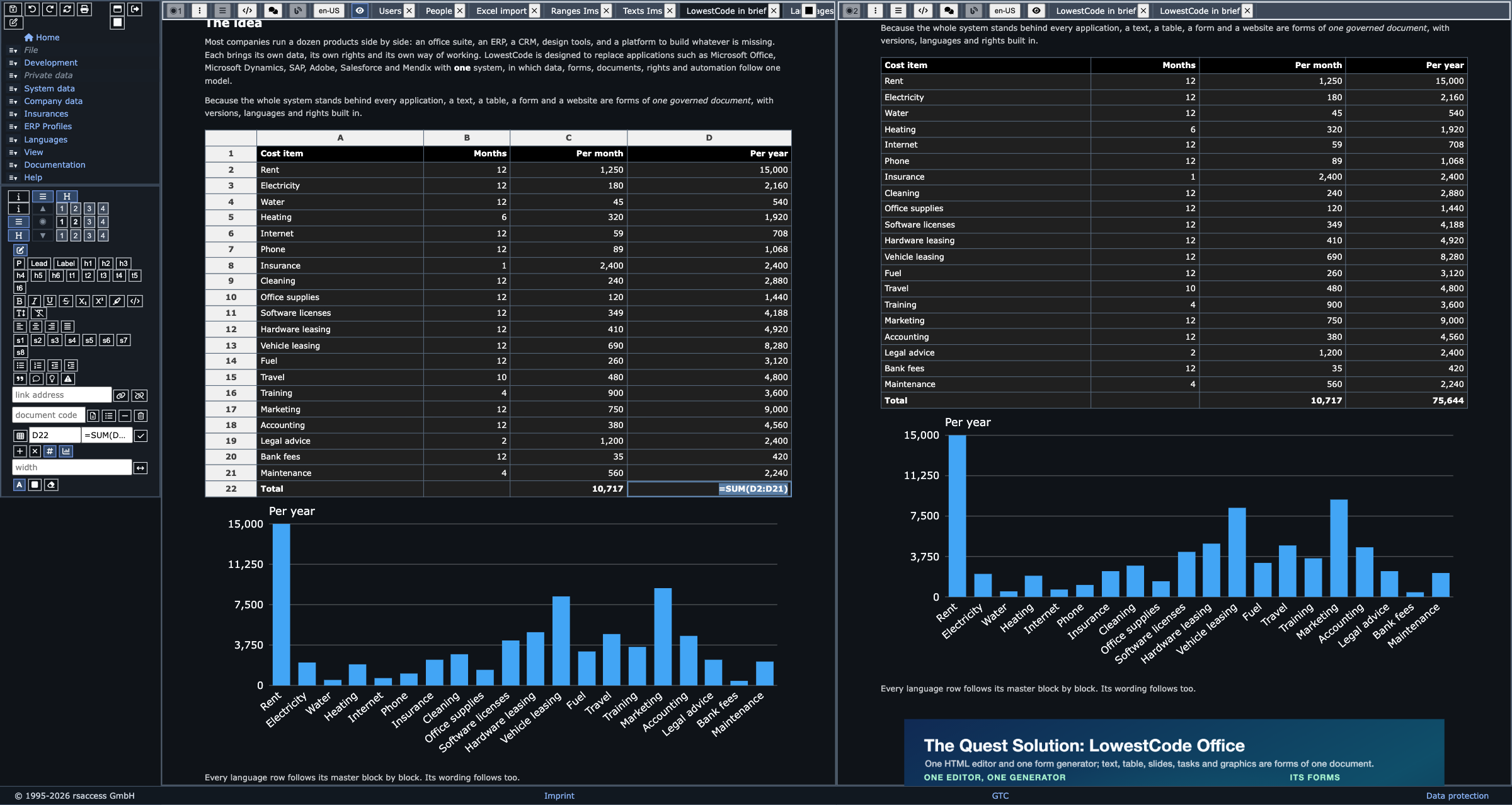
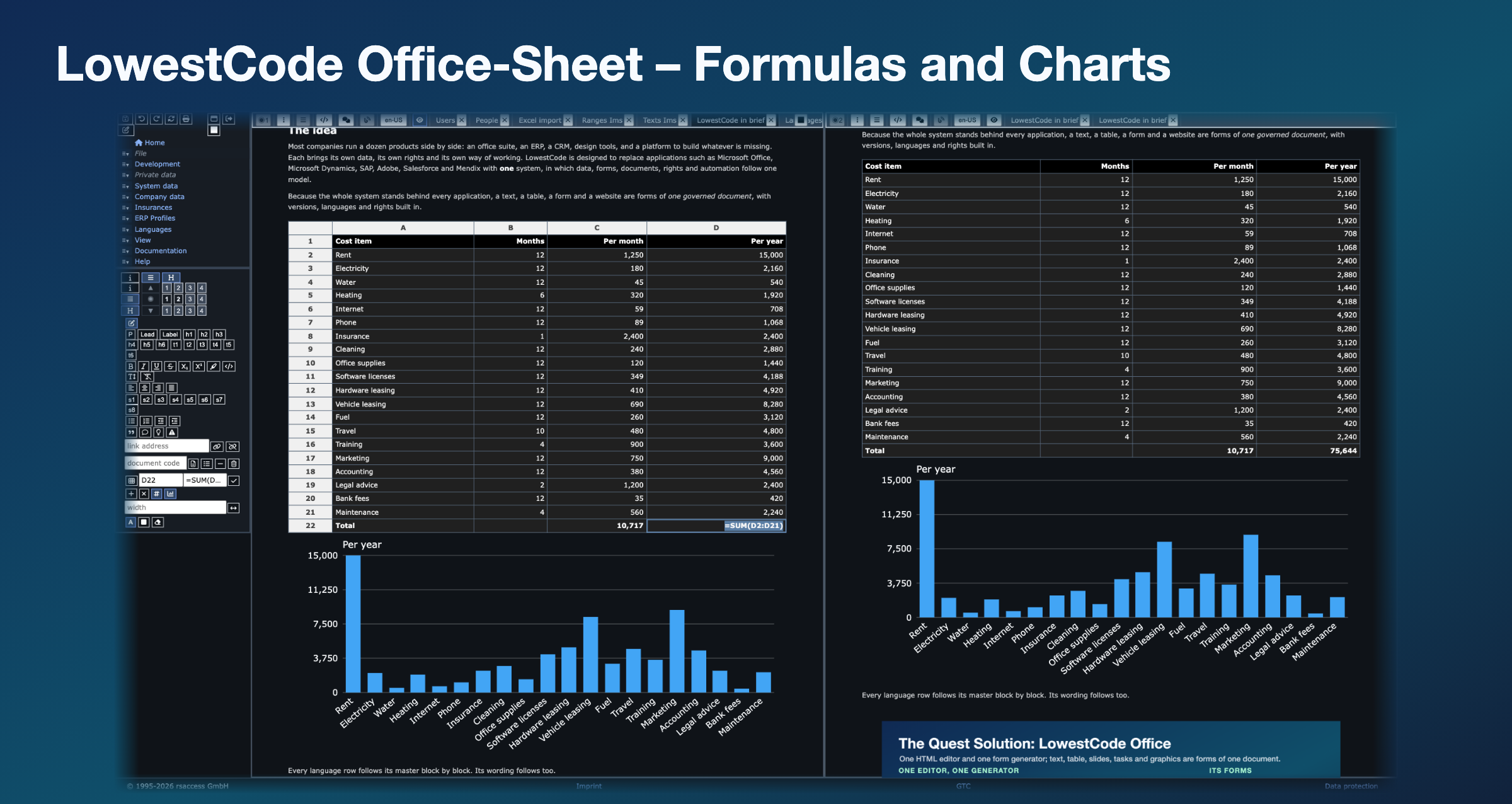 LowestCode Office-Sheet: a sheet with formulas and a chart inside the document, built for full RPA
-
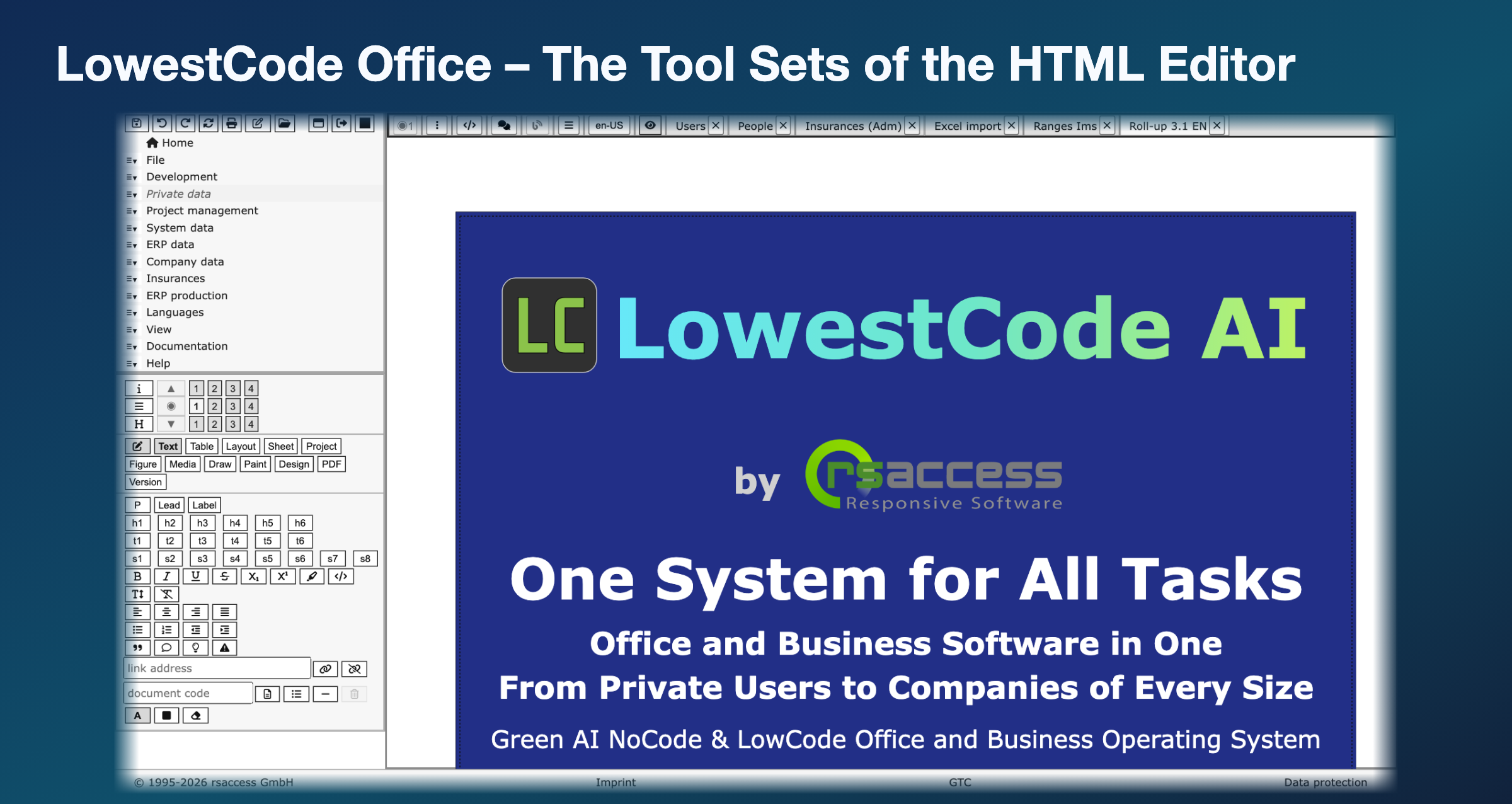 LowestCode Office tool sets: the tools of the HTML editor, active while a text is edited
-
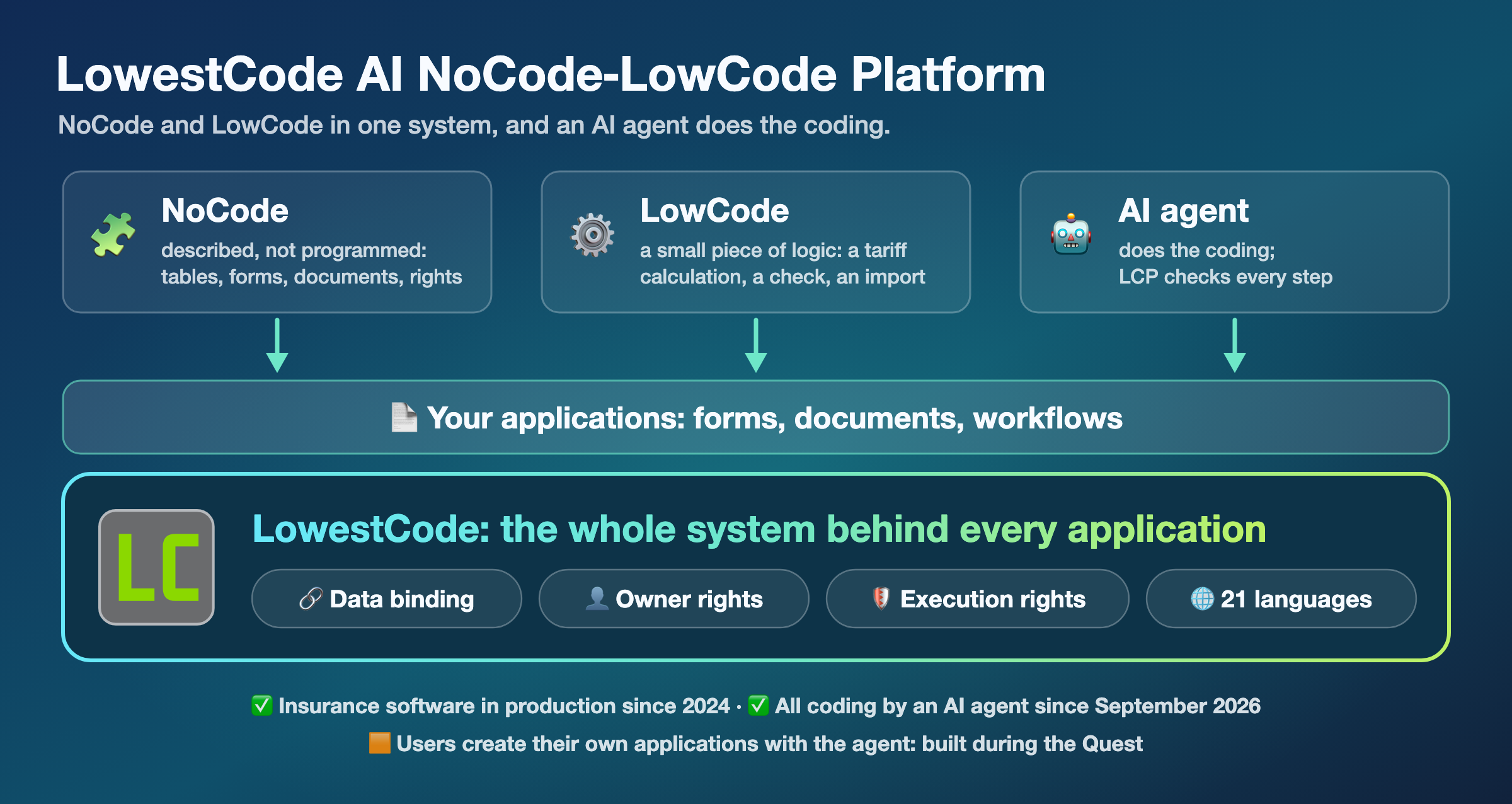 NoCode, LowCode and AI: the whole system behind every application
-
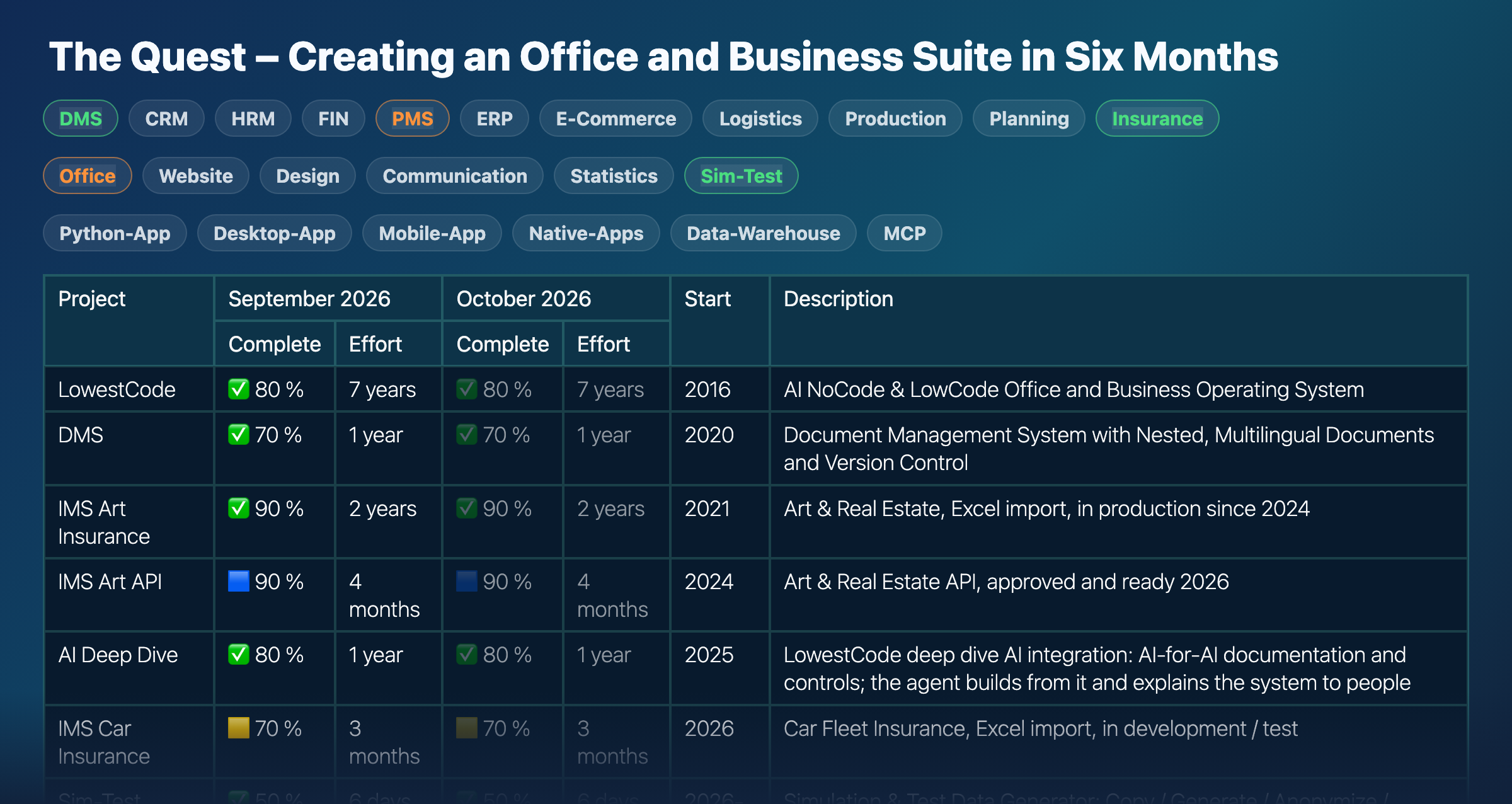 The Quest – updated every month
-
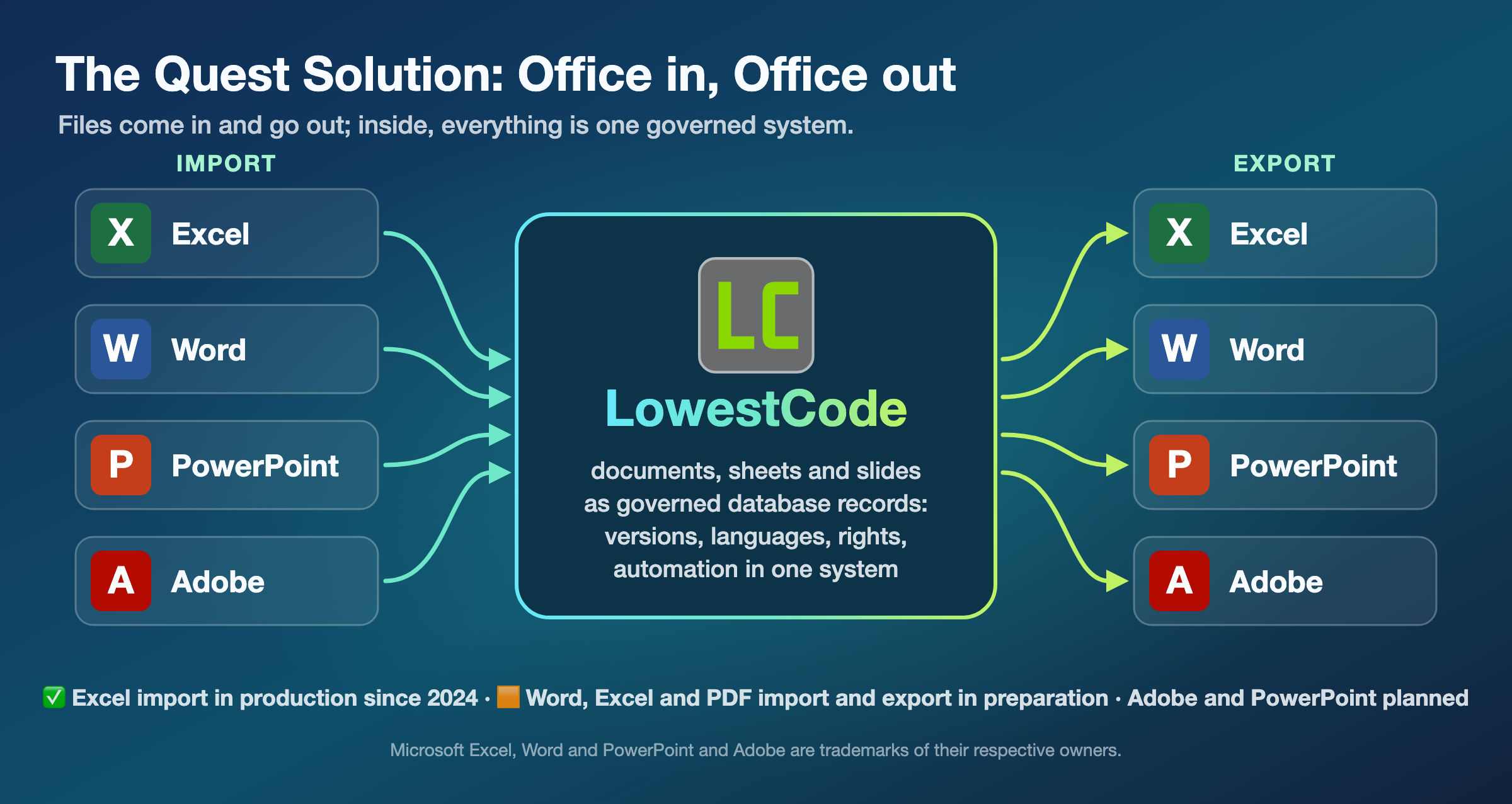 Import and export with Office tools
-
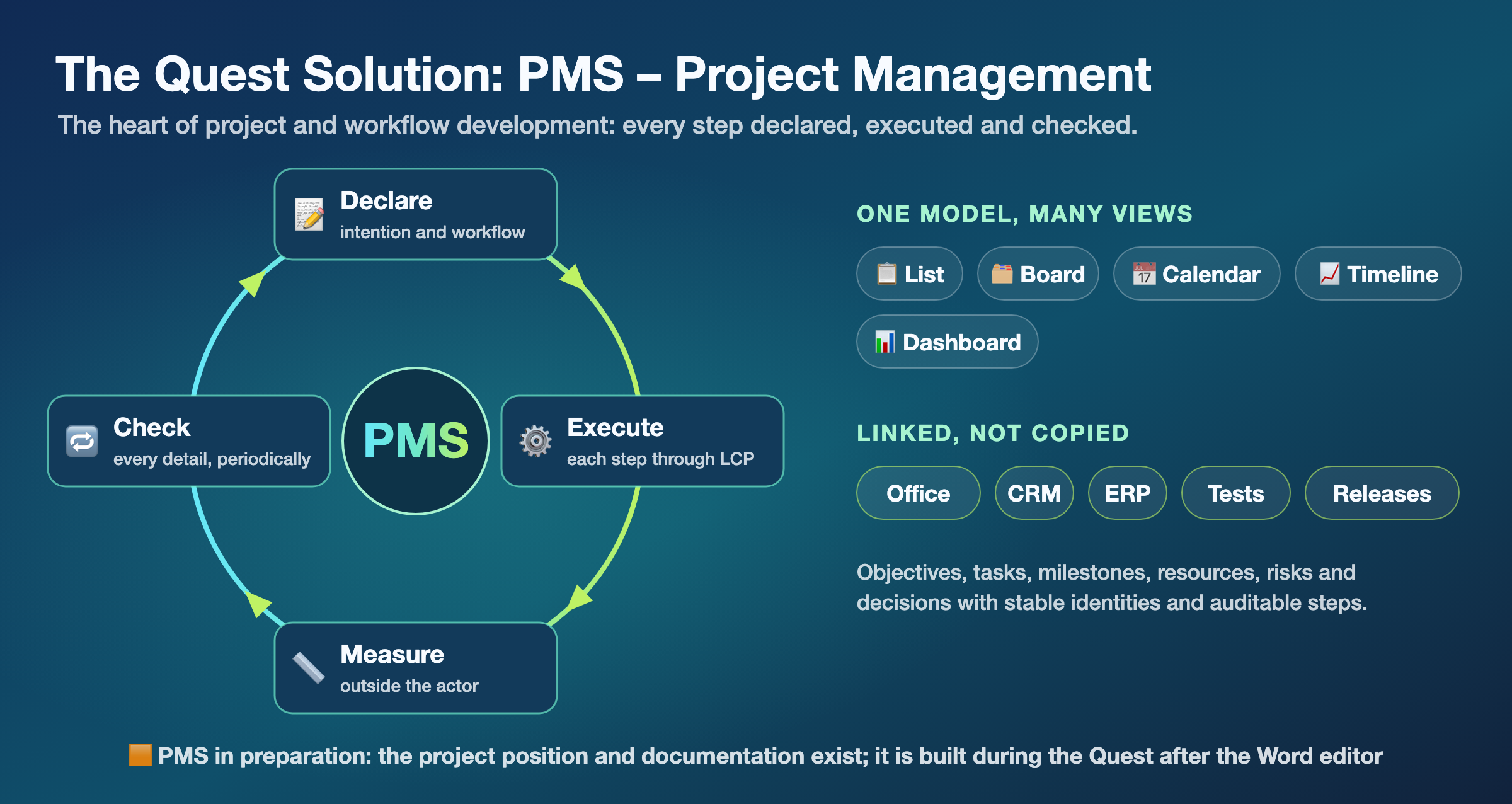 PMS: projects and workflows, declared and checked
-
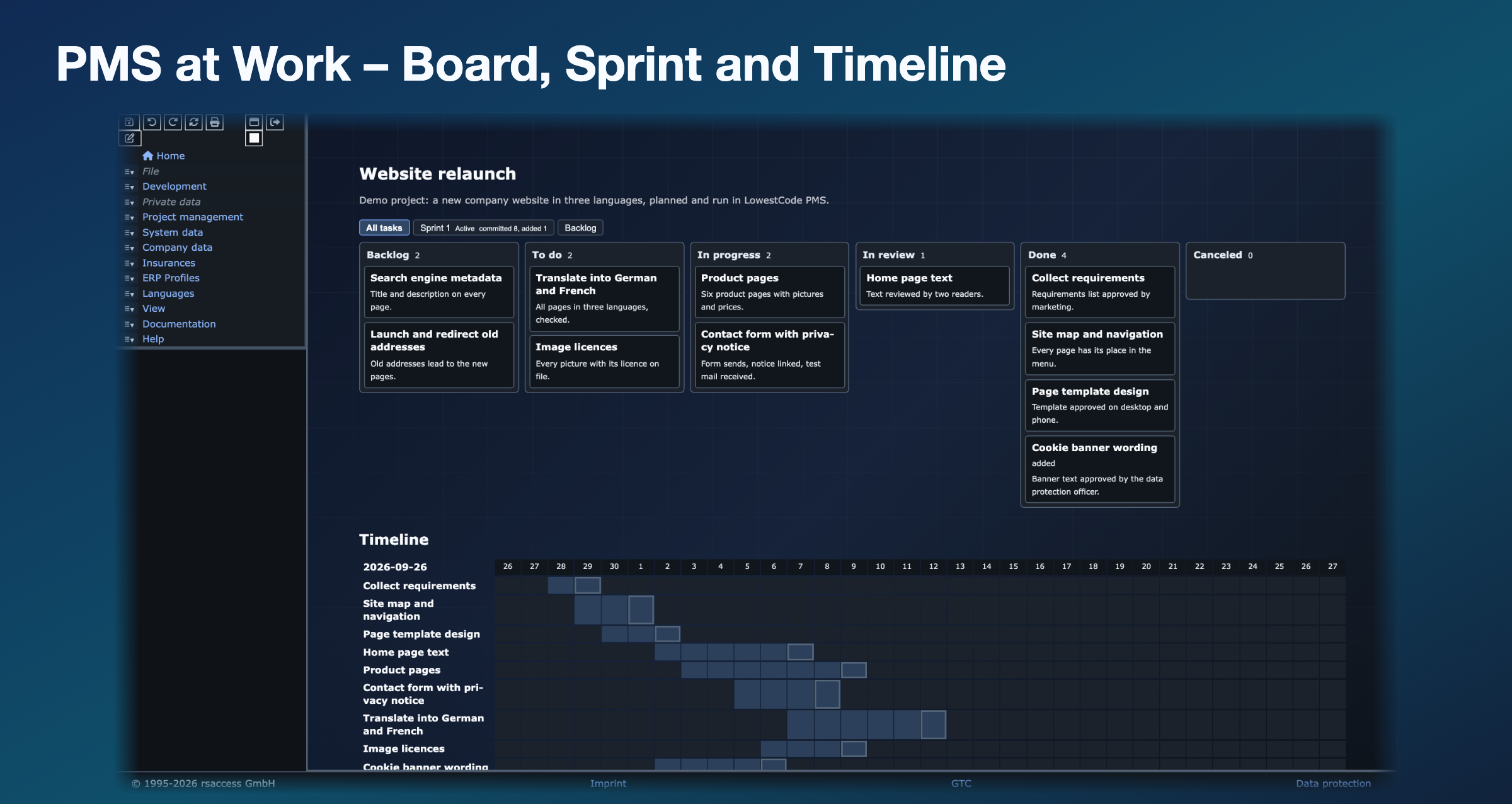 PMS at work: a demo project on the board, with its sprint and timeline
-
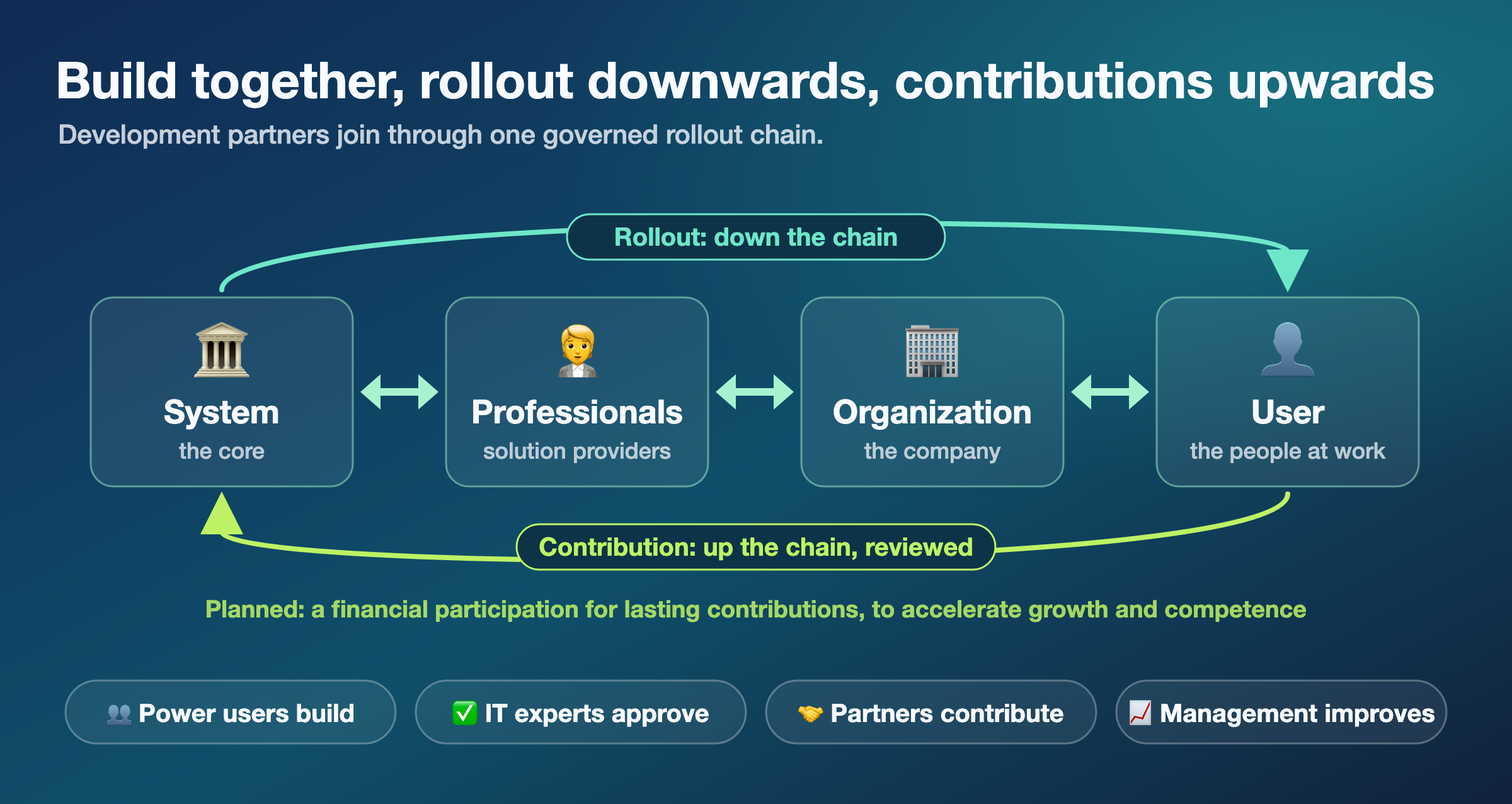 The rollout and contribution chain
-
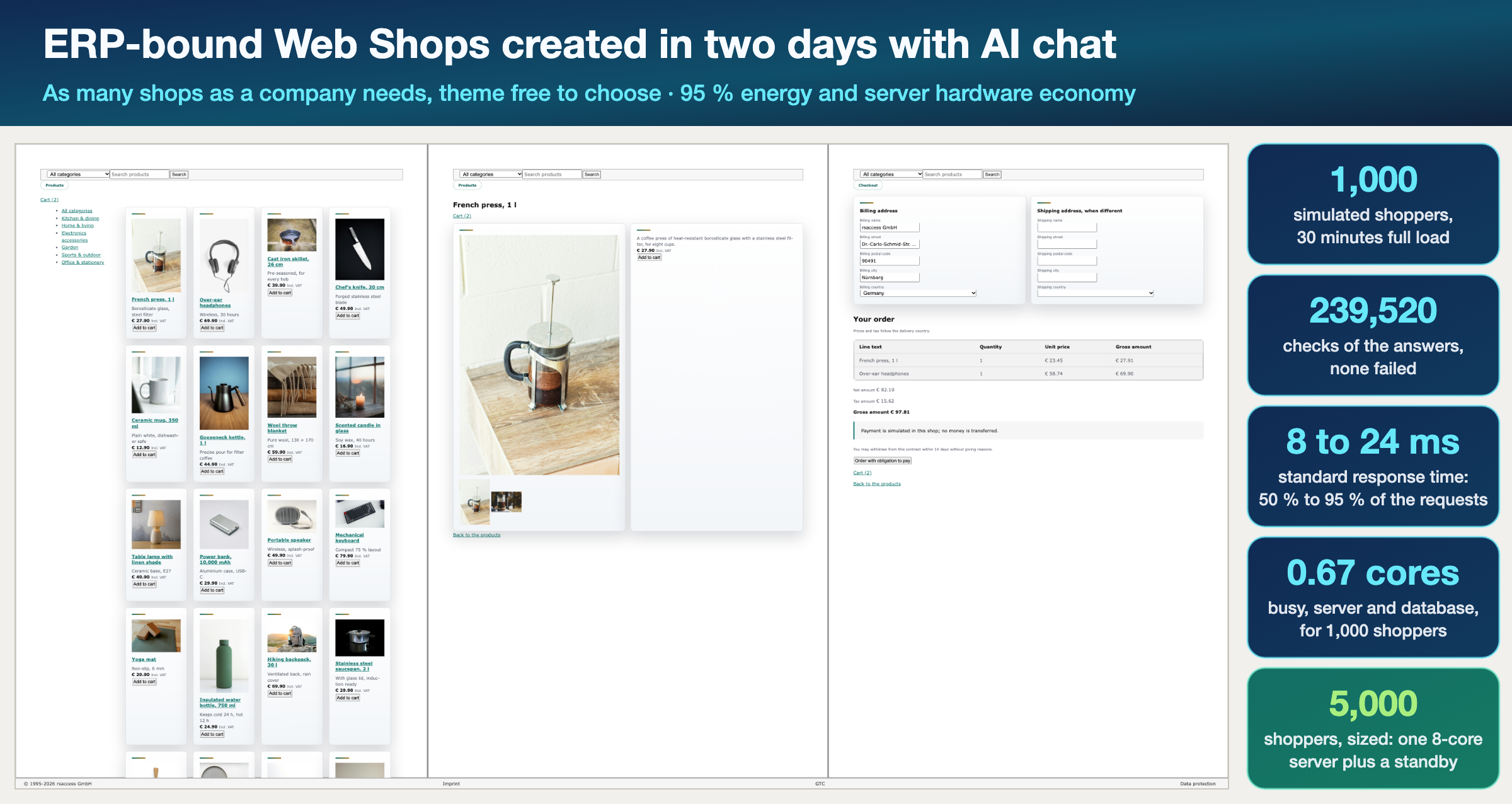 ERP-bound web shops, created in two days with AI chat and load-tested.
-
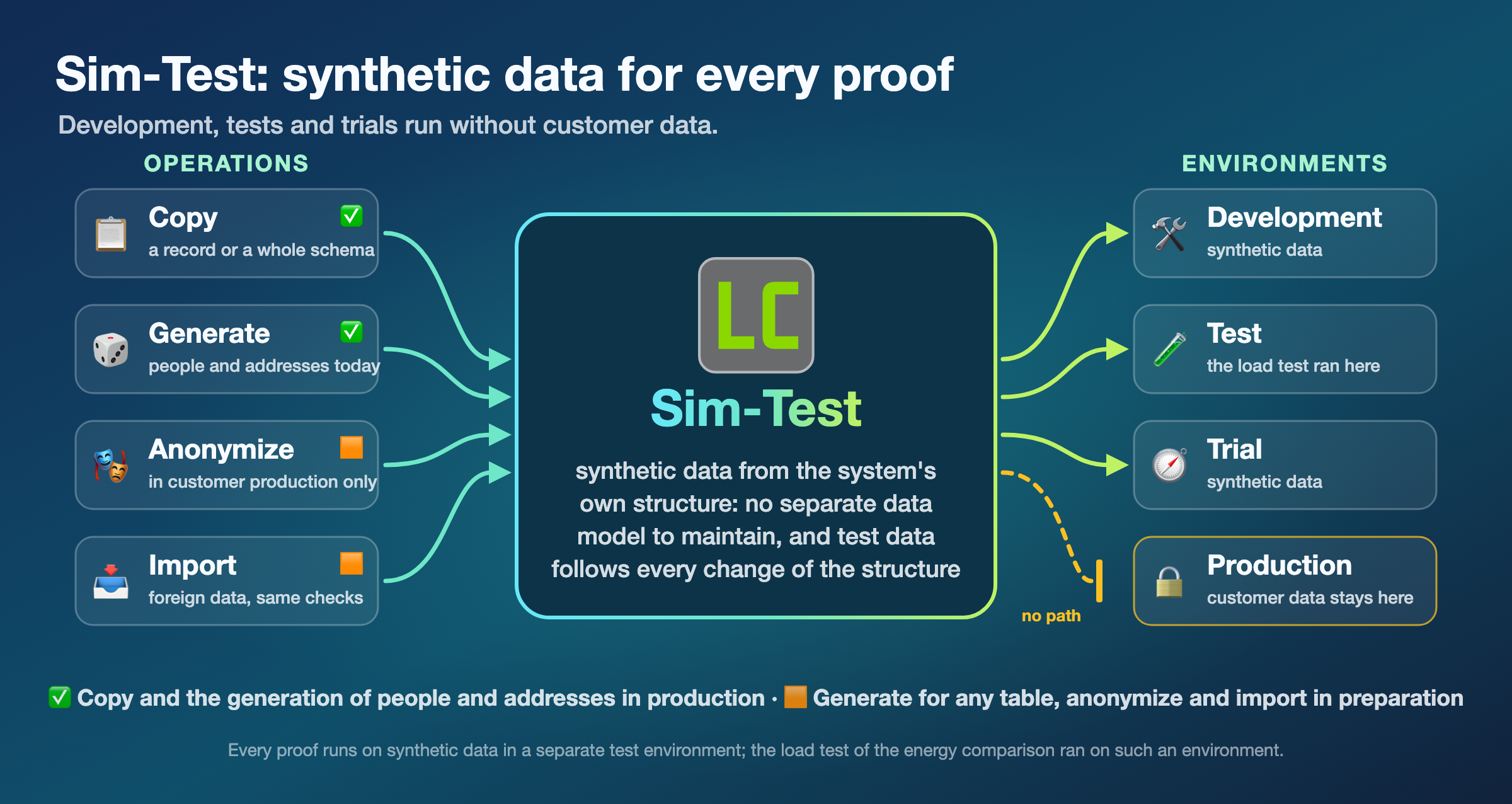 Sim-Test: synthetic data for development, test and trial
-
 Innovation and cooperation
LowestCode AI brings Office, ERP, e-commerce, and software development into one workspace. Individuals and businesses get work done and create or extend applications as needed through AI chat.
All LowestCode office and business applications are lightweight, clean, and fast—secure, privacy-focused, and multilingual by design, with 21 languages from the start. They run in European cloud environments or on desktops and are designed to support compliance with EU requirements for data protection, cybersecurity, and AI.
Our objective is a fully automatable system with a clear, well-structured architecture, enabling end-to-end automation of office work, business processes, and application development.
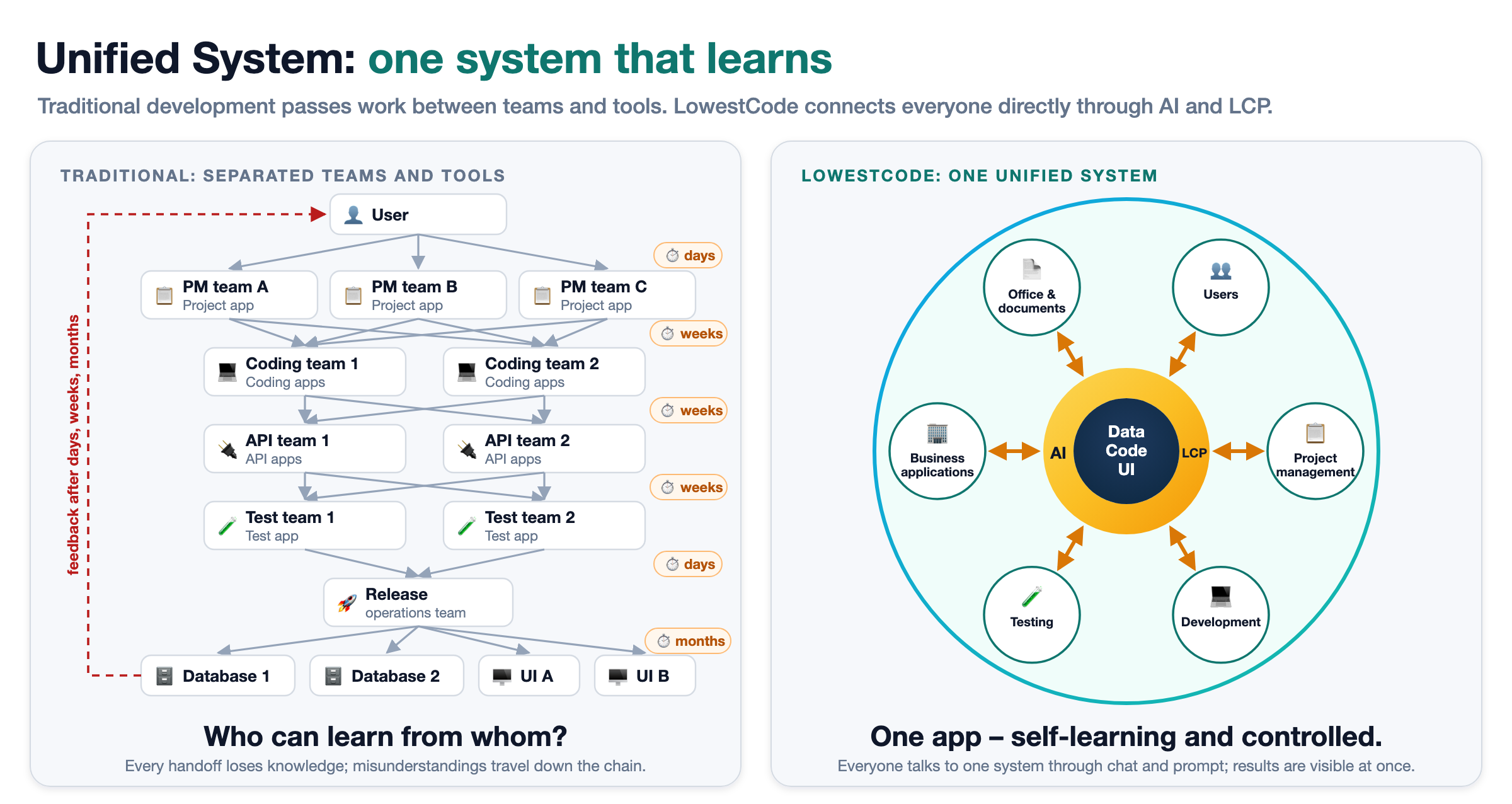
No more manual coding for professionals and users: coding, project management, and testing run entirely through AI chat under LowestCode’s controls, supported by a transparent architecture made for AI.
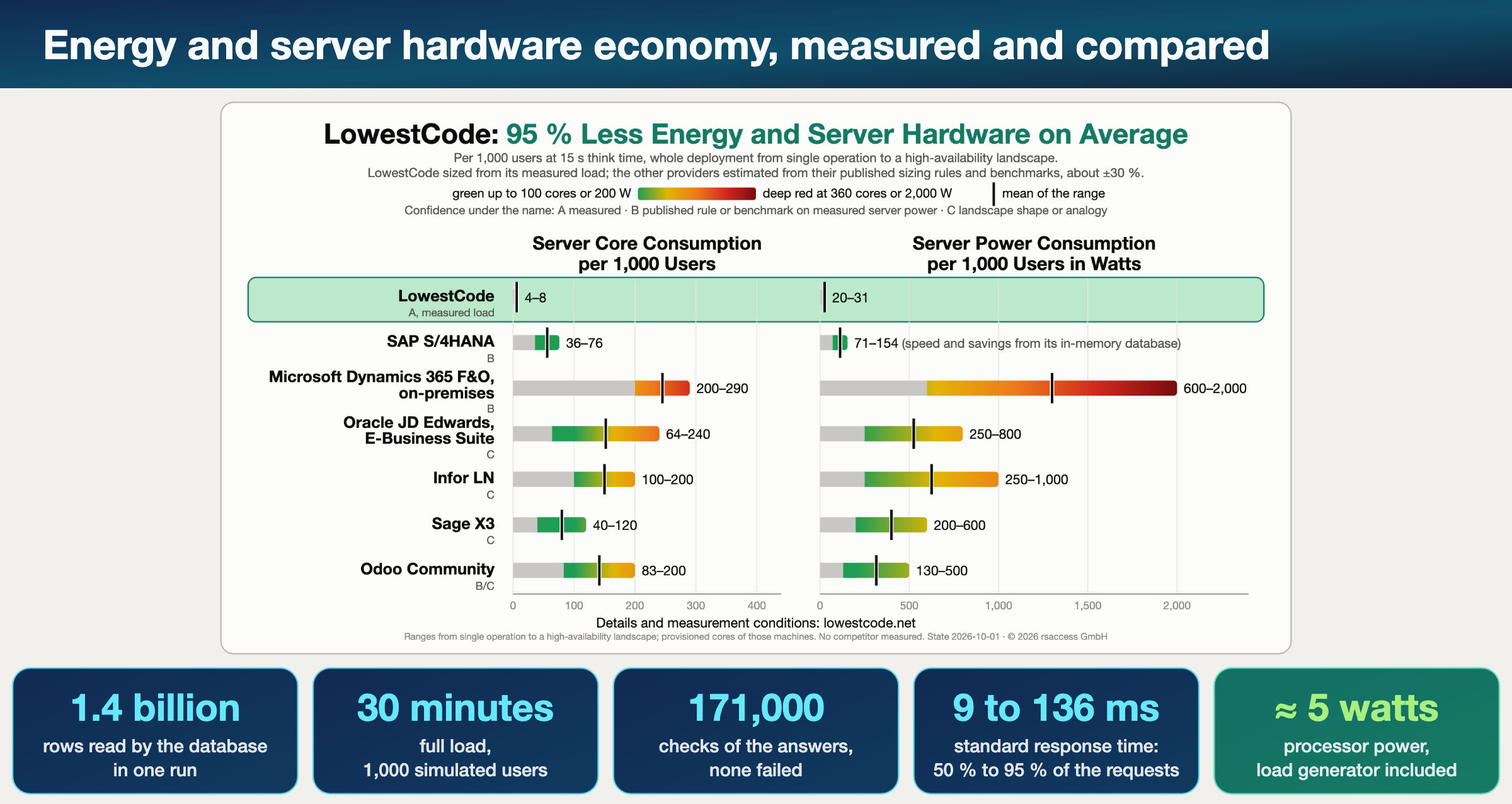
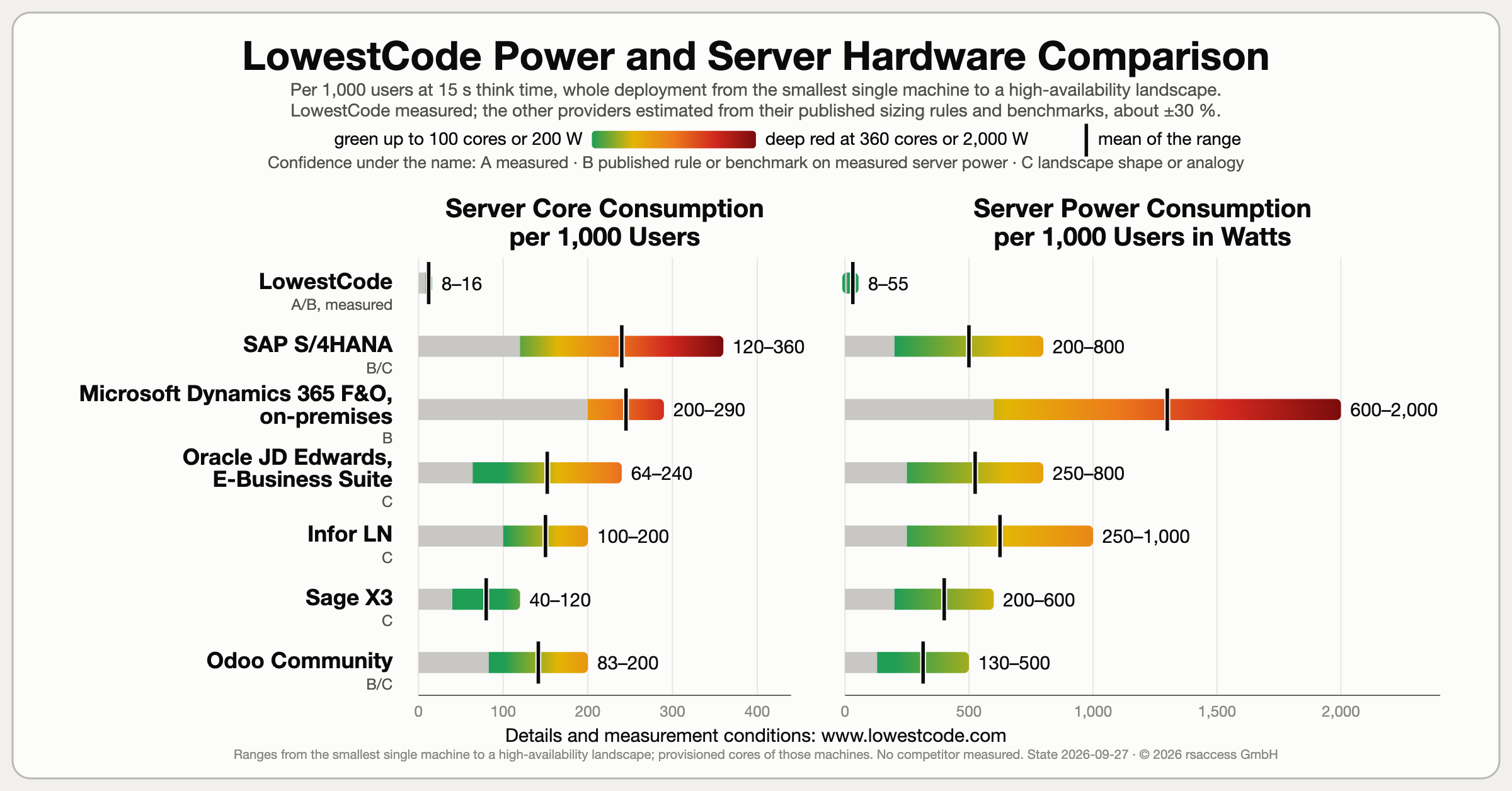
A green revolution for business software: on average, 95 % less energy use and server hardware than six leading business systems, based on our own load measurements and estimated sizing for those six systems.
Build together, roll out downwards, contribute upwards: system developers, IT service providers, customer organizations, and users develop independently without interfering with one another, supported by automated rollouts and controlled contributions.
LowestCode is designed to replace applications such as Microsoft Office, Microsoft Dynamics, SAP, Adobe, Salesforce, and Mendix, bringing office work, business operations, design, and application development into one integrated system.
Users adapt and optimize their workflows and applications by talking with the integrated AI agent, which respects the permissions for documents, forms, and users.
All product names are trademarks of their respective owners.
One system in place of many applications What LowestCode is designed to replace, and where each part stands today.
Companies run their work on many separate applications: an office package, an ERP, a CRM, design tools and a platform to build their own. LowestCode is designed to replace them with one system, and to go beyond them: built new, without the legacy of decades, with a modern workplace of several windows side by side, faster work in the cloud and professional options from the start. The map shows where each part stands today.
The whole range of LowestCode
- DMS
- CRM
- HRM
- FIN
- PMS
- ERP
- E-Commerce
- Logistics
- Production
- Planning
- Insurance
- Office
- Website
- Design
- Communication
- Statistics
- Sim-Test
- Gaming
- Learning
- Java-App
- Python-App
- Desktop-App
- Mobile-App
- Native-Apps
- Data-Warehouse
- LCP
- MCP adapter
The color of a pill shows the state of its project: in production, in test or in preparation; a pill without color is planned.
✅ In production · 🟨 In test · 🟧 In preparation · ⬜ Planned · As of
What it is designed to replace
The percentage is our estimate of how much of each project's planned scope is built, not a comparison with the named product.
Designed to replace | LowestCode part | State · planned scope built | Effort so far |
|---|---|---|---|
Microsoft Office Office work | Office-Text Office-Sheet Office-Table Office-Layout Office Design | ✅ 95 % ✅ 90 % 🟨 85 % ✅ 90 % ✅ 85 % | 28 days 12 days 2 days 4 days 4 days |
Adobe Design, graphics, PDF | Design, Draw, Paint and PDF tools | ✅ | – |
Microsoft Dynamics, SAP ERP | ERP FIN ERP Web Shop | 🟨 30 % 🟨 30 % ✅ 60 % | 2 days < 1 day 4 days |
Salesforce CRM | CRM | Planned | – |
Mendix Application building | LowestCode LCP-Chat LCP * MCP adapter * | ✅ 80 % ✅ 50 % ✅ 45 % 🟧 | 6 years 6 days 2 days – |
And more Projects, documents, test data | PMS DMS Sim-Test | ✅ 50 % ✅ 75 % ✅ 55 % | 4 days 1 year 6 days |
State and effort come from the project table of the Quest. Effort is the running time of the work, the time elapsed, rounded; 10 hours count as one day. A dash marks a part without a value of its own; the tools of Office are described under Office tool sets. * LCP is in production; the MCP adapter, the adapter for the external Model Context Protocol, is in preparation.
All product names are trademarks of their respective owners.
An application, not a suite
A suite bundles separate products, a word processor beside a spreadsheet, an ERP beside a CRM, each with its own data, rights and screens, joined by interfaces. LowestCode is one application: documents, sheets, business data, rights and versions live in one shared model, so a new part extends the application instead of adding a product to connect.
The Quest: public proof of the system and of high-speed development
October to December 2026: one AI agent, guided by one human, creates the Office and Business Application, and the state and the effort of every project are published month by month. The map and the pills take their values from it.
The AI agent codes. LowestCode controls. 100 % AI chat execution in one LowestCode system: coding, project management, and testing. Simultaneously, controlled and safe.
An automation engineer's approach, not an IT one: every operation is a defined step, checked before it acts and measured after it, as in a plant. Data, code and user interface form one model, every change runs with its rights decided first, and its result is measured outside the agent. That is why the agent can code, structure and test the whole system safely, and why every step of the system can be automated.

LowestCode is what AI needs: NoCode and LowCode in one integral, compact system for Office and business applications, and LCP controls every step. The result is controlled agent coding, high coding efficiency, and a clear interface for people.
95 % less energy and server hardware on average Documented resource efficiency: own load measurements and estimated sizing for six leading business systems; SAP comes closest with in-memory.
LowestCode keeps about one core busy for 1,000 users, measured; sized with headroom and a standby, that is four cores, eight with high availability on two sites. Five of the six other systems need far more, estimated from their published sizing rules, benchmarks and typical landscapes.
- 1.4 billionrows read by the database in one run
- 30 minutesof full load
- 171,000checks of the answers, none failed
- 9 to 136 msstandard response time: 50 % to 95 % of the requests
- ≈ 5 wattsprocessor power, load generator included
The web shops were measured the same way; their figures stand in the web shop picture and the load test report.
The numbers, their sources and the measurement are on these pages; no competitor product was measured. All product names are trademarks of their respective owners.
Power users deliver.
IT experts guide.
Development partners join through one governed rollout chain.
The LowestCode rollout system lets development partners build independently without interfering with one another, as the integrated AI agent does the coding and keeps it consistent.
- System
- Professionals
- Organization*
- User
We roll out code and data: documents and information such as taxes and legal information, where each customer can choose which services to implement.
Contributions travel up the chain in a controlled way. Once we are established on the market, we plan a participation system that rewards lasting contributions.
- User
- Organization*
- Professionals
- System
In addition, every partner installation rolls out from local development to production.
* In LowestCode development, the Organization level is played by the insurance use case, in practice since 2024.
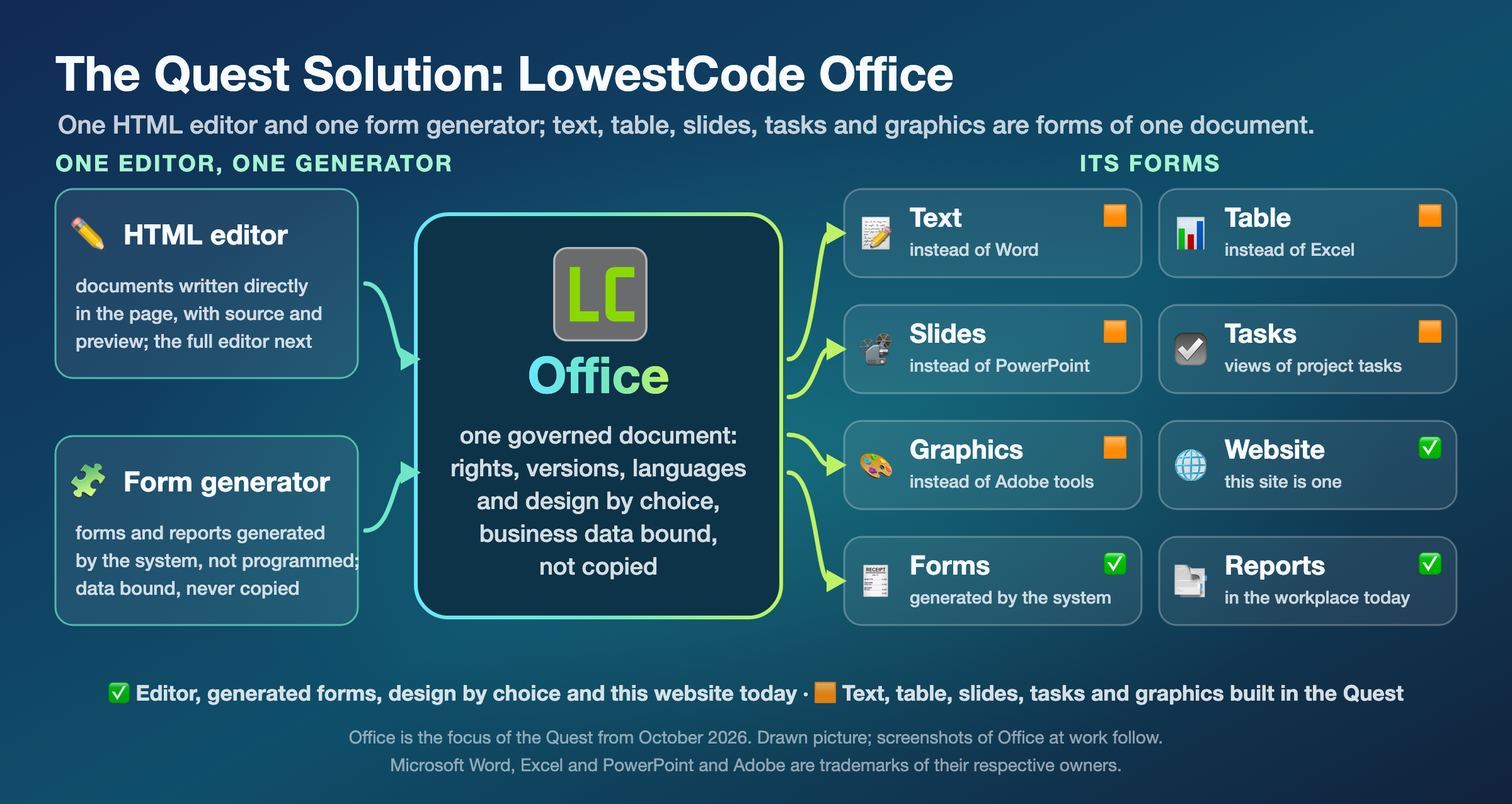
LowestCode Office at work Text documents, tables, presentations, notes, reports and websites are forms of one governed document, not separate programs.
LowestCode Office is the working surface of the system, with the HTML editor and the form generator at its core: documents are written in the editor, forms are generated by the system rather than programmed, and both keep their rights, versions and languages in the system.
- Text
- Design & Publish
- Markdown
- Table
- Grid
- Sheet
- Project
- Figure
- Media
- Draw
- Paint
- Chart
- Layer
- Layout
- Version
- Binder
- Languages
- Properties
- Forms
- Secure Document AI Chat Agent
- Themes & Formats
Import and export: Word, Excel, PowerPoint and PDF are formats LowestCode Office imports and exports with its own means; the document itself, with its rights, versions and languages, stays in the system. All product names are trademarks of their respective owners.
Data protection and security by design
A LowestCode document is not a file on a disk or a share. It lives in the system, so the same rights, owners and versions decide who reads and changes it, people and the AI agent alike. A Word, Excel or PDF file is an export, not the document. Data protection and security come from how Office is built, not from a feature added afterwards.
One workplace.
One development IDE.
Many windows.
One shell for any application, LowestCode Office included.
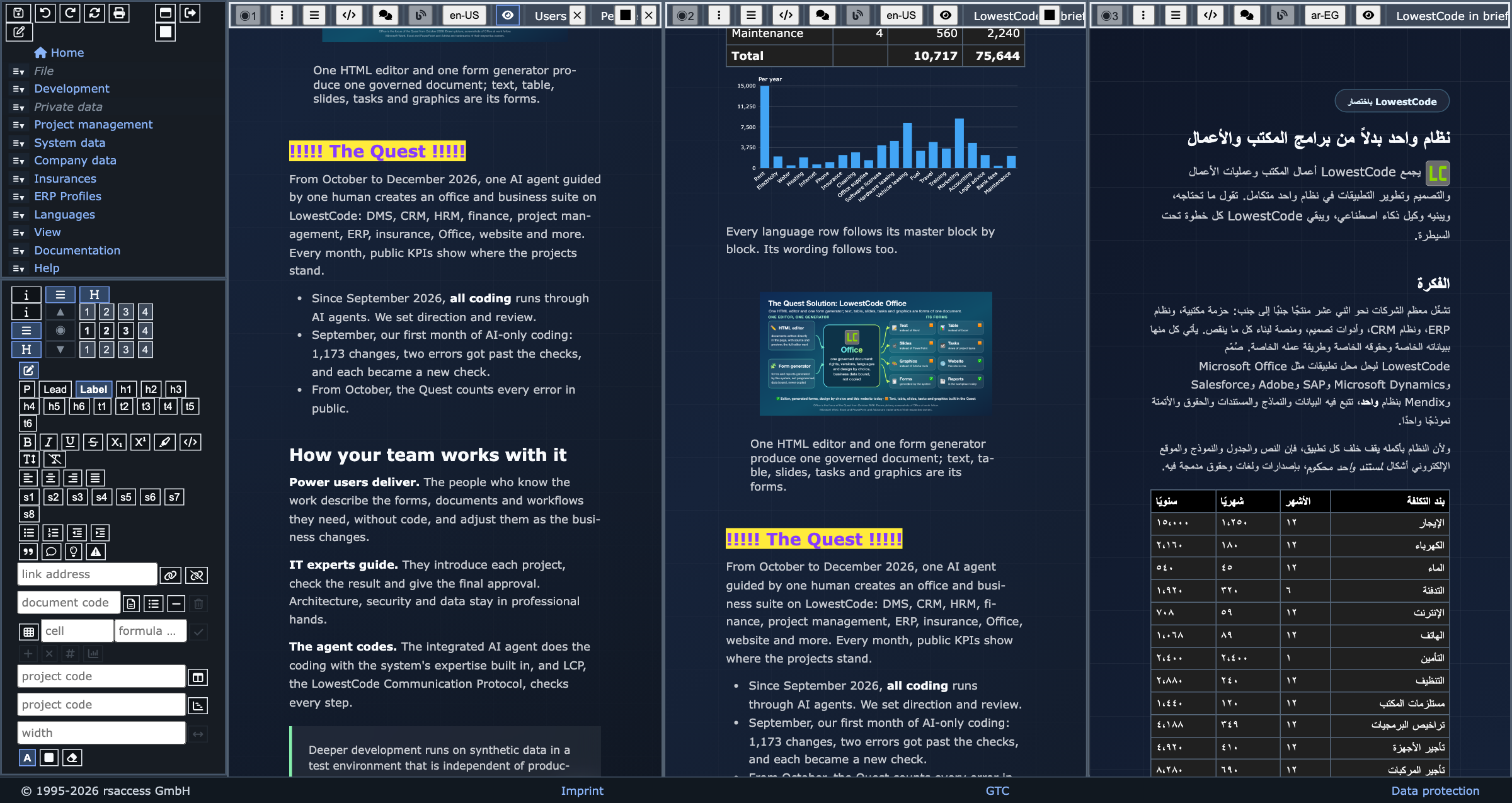
Your windows, ready when you log in
From a single window to a complex working and development environment, the workplace fits the task. Your windows and their layout are saved and preloaded, ready the moment you log in. Working environments can be defined for each task and guarded by rights. Windows sit side by side, and the same document can be open in many of them, working in sync. The same system is your workplace and your development and test environment, so you build your own applications there and test them on synthetic data before they reach production. The test environment is independent of production, separate in data and files, and always available and accessible.
One menu, two views, one toolbar
The navigation is one menu shown two ways, as a side tree or as a top menu. The side menu doubles as the toolbar, with the HTML editor's controls in it, as on the left of the picture. Themes and formats change the look, not the content.
The development IDE inside the workplace
The development IDE is not a separate program. It uses the same multi-window workplace: the code walkthrough opens beside the forms and documents of the day, visible to developers by rights and invisible to everyone else. Users work in the normal workplace and never meet the coding capability.
An ERP for industry, from the order to the machine Trade, production, machine building and logistics in one system, built on a real industrial business.
We build the ERP on a real business: a metal profiling company that trades and sells online, profiles steel from the coil, sends profiles out for coating, builds machines for itself and for its customers, maintains them, takes on robot automation projects, and runs its own logistics and transport. The web shops are part of the ERP: their pages show the products, prices and taxes the back office maintains, as they stand at the moment of the view, and every order lands with its lines, addresses and payment where the back office works with it.
Sim-Test: synthetic data for every proof What a company gets from it: data checks, security, load checks and planning simulations.
Every company needs this, and most ignore it: software has to be proven before real data and real money depend on it, and proven without handing customers' data to developers, testers or an AI. Sim-Test makes both possible: synthetic data in the shape of your business, generated from your own structures.
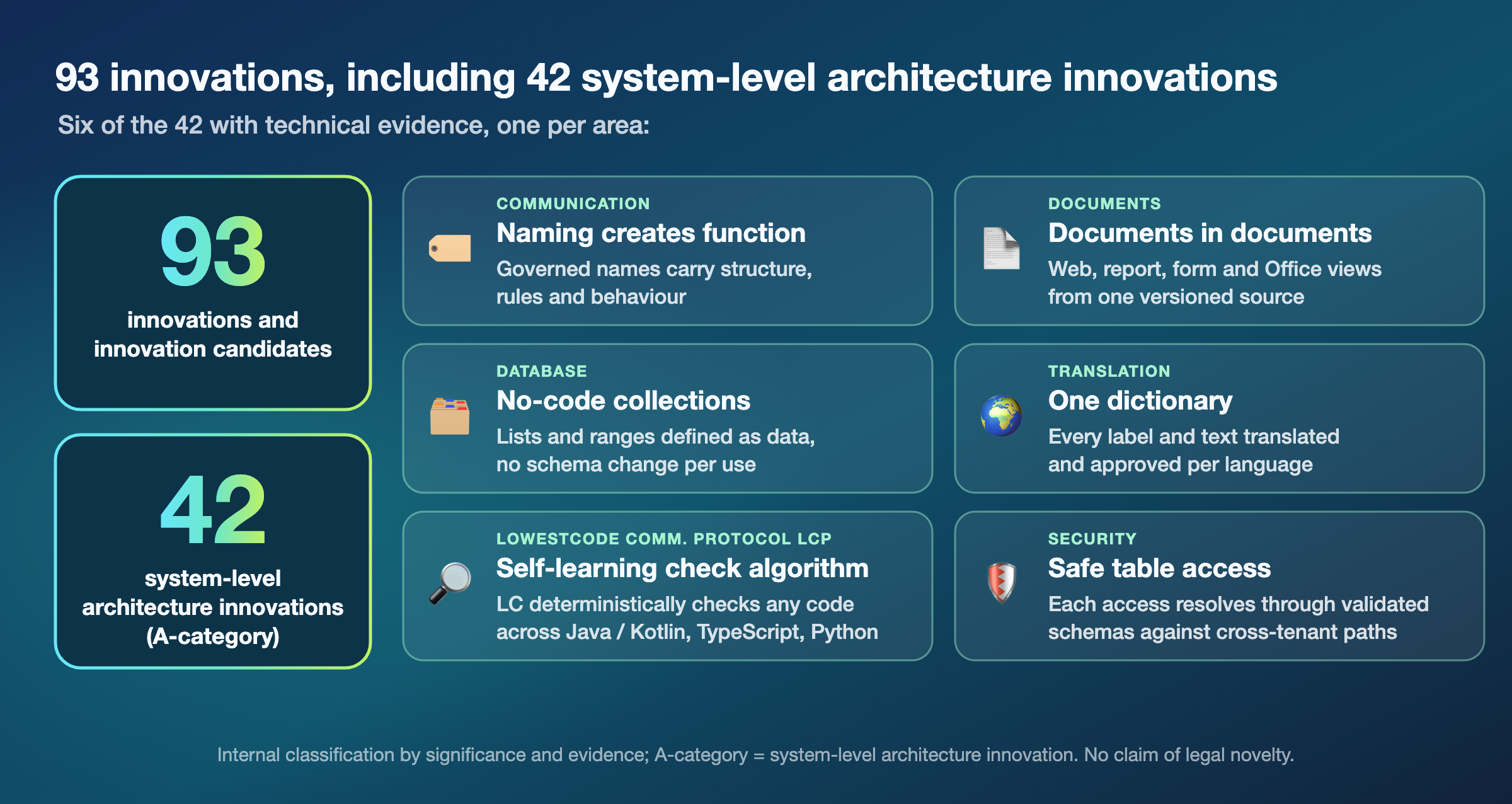
A structured innovation portfolio grounded in working software Deterministic AI, internationalization, digital sovereignty, and measurable efficiency.
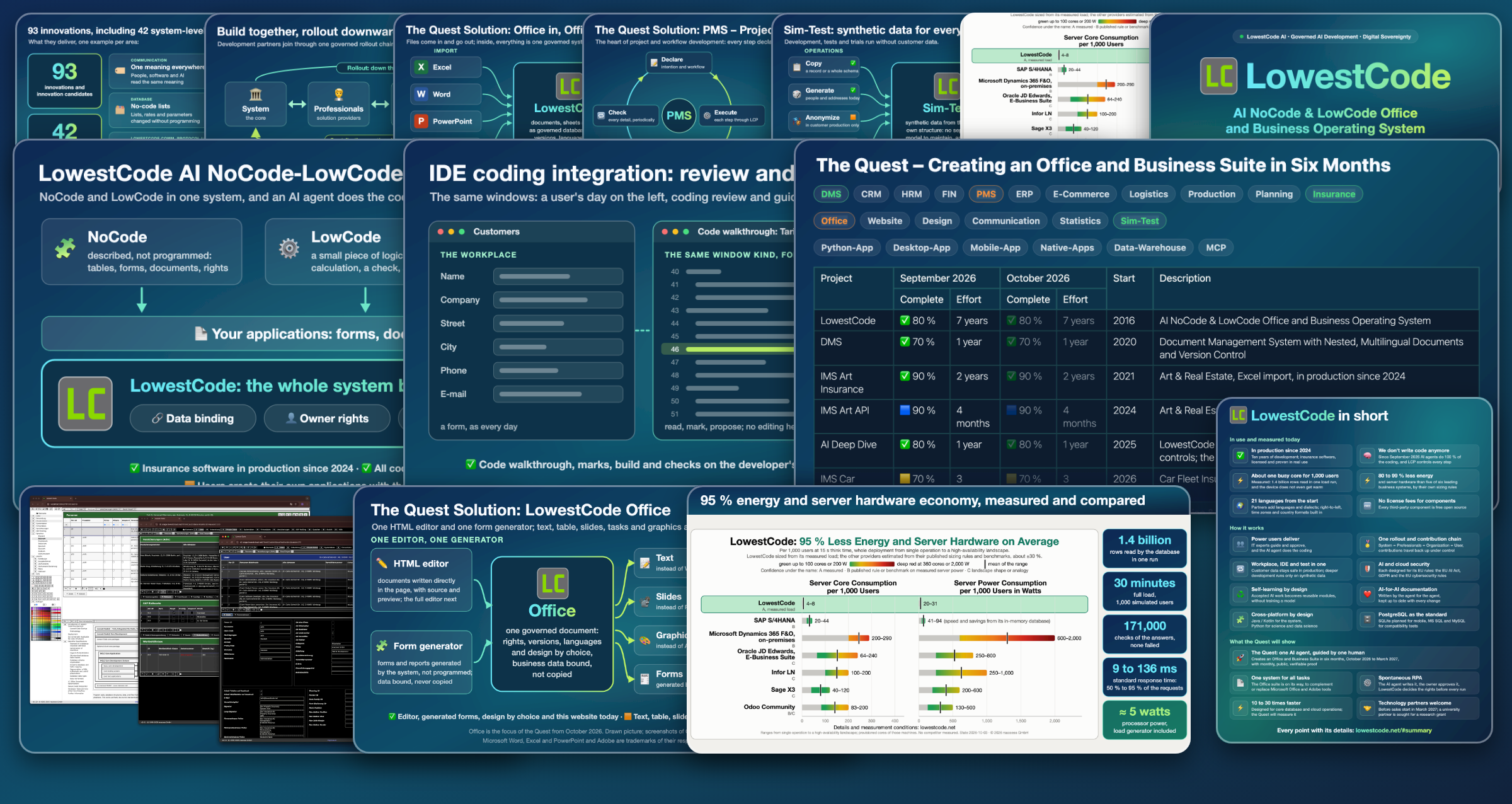
We have structured a portfolio of 94 innovations and innovation candidates, including 43 system-level architecture innovations (A-category). They rethink how database semantics, documents and interfaces, automation, AI governance, security, and deployment work together. On this basis we are preparing a research grant application to the German research ministry (BMFTR, formerly BMBF) and are looking for a university partner.
For customers: What we modernize.
The business
Model: we deliver the technology, and partners bring it to customers. Revenue comes from licenses per user and month, through partners and direct, and from building applications for customers with the AI agent.
First market: mid-sized companies, insurers and organizations in the German-speaking countries that modernize Office work, processes, Excel and VBA. We enter through concrete projects.
Market: Office and ERP are the core markets; Gartner forecasts USD 58.2 billion for low-code technologies worldwide in 2029 (forecast analysis of November 2025).
Expansion: partners offer LowestCode as their own application layer; AI providers and cloud hosts add it to their models and hosting.
Investment: we are looking for strategic investors who are partners as well, and for business angels. The funds go mainly into marketing and sales, then into partner engineering and operations, toward one goal: LowestCode in common use, nationally and across Europe.
LowestCode in short One integral, compact system for Office and business applications, and LCP controls every step. Many problems solved.
In use and measured today
- ✅Ten years of development, proven in real use: insurance software certified and in production since 2024 at an international insurance group, with due diligence passed and labor union approval.
- 🧠We don't write code anymore: since September 2026, coding, project management and testing run 100 % by AI chat, on the NoCode & LowCode (NCLC) system with the LowestCode Communication Protocol (LCP), which checks each request before it runs.
- ⚡About one busy core for 1,000 users, measured: in one 44-minute load run, 30 minutes of it at full load, the database reads more than 1.4 billion rows, and the device does not even get warm.
- ⚡Green tech: 95 % less energy and server hardware on average than six leading business systems, from our own load measurements and estimated sizing for the six; SAP comes closest with in-memory.
- 🌍21 application languages from the start, and each partner can add languages or define dialect variants; right-to-left scripts, time zones and country formats are built in.
- 🆓No license fees for components: every third-party component is free open source. AI agents and cloud hosting are external services with their own terms.
How it works
- 📄Office, business applications and ERP in one workspace: LowestCode Office stands built since 8 November 2026 and is in our own use, and the ERP with its web shops is being built in the same system.
- 🏅One rollout and contribution chain: System ⬌ Professionals ⬌ Organization ⬌ User. Partners build independently, and contributions travel back up in a controlled way.
- ⚙️An automation engineer's approach toward a fully automatable system: every operation is a defined step, checked before it acts and measured after it, as in a plant, and people, workflows and the AI agent run the same steps.
- 🔒Data protection and security by design: every document and record keeps its rights, owners and versions in the system, for people and the AI agent alike; development and test run on synthetic data. Designed for the EU rules: GDPR and EU cybersecurity for the cloud, the EU AI Act for the AI.
We set the direction. AI agents code. LCP controls.
© 1995-2026 Dr.-Ing. Raimund Reisacher –
LowestCode technology
German patent application DE 10 2021 103 571 –
relational database system, pending
© 1995-2026 rsaccess GmbH –
LowestCode website, marketing and sales
LowestCodeLowestCode © Dr.-Ing. Raimund Reisacher · hosted by rsaccess GmbH
This document is available in English only. It is the text we check and verify.
Office
LowestCode Office: text, sheets, tables, presentations and design as forms of one governed document, with Word, Excel and PowerPoint files in and out
- Office-Text
- Office-Sheet
- Office-Table
- Office-Layout
- Office Design
- Start 2026-08
- Project overview
What LowestCode Office is
LowestCode Office is the working surface of the system: text documents, tables, presentations, notes, reports and websites are forms of one governed document, not separate programs. It contains no Microsoft components and no components that require paid licenses. Word, Excel, PowerPoint and PDF are formats it imports and exports with its own means; the document itself, with its rights, versions and languages, stays in the system.
Its goal is that a company needs no Microsoft Office for its internal work. LowestCode Office first complements it and then replaces it as an option, one area of work at a time, while files for customers and partners keep their usual formats.
Data protection and security by design. A LowestCode document is not a file on a disk or a share. It lives in the system, so the same rights, owners and versions decide who reads and changes it, people and the AI agent alike. A Word, Excel or PDF file is an export, not the document. Data protection and security come from how Office is built, not from a feature added afterwards.
Fully automatable. Like the whole system, Office is designed to be fully automatable: every tool is a defined, checked step that a person, a workflow or the AI agent runs alike, so office work can run automated from end to end.
Working today
- Documents in the workplace. Documents, forms and reports open in the multi-window workplace, each with its own versions, languages and rights.
- Written in the page. Text, tables, sheets, project views, figures, audio and video, vector graphics, painting, charts, layers, layouts with presentations and design pages are written in the page, with the document's versions, languages, rights and binders, and every print is a PDF beside its document.
- A sheet inside the document. A sheet stands inside the document with its formulas, values and chart.
- Office in, Office out. Word, Excel and PowerPoint files come in and go out: a Word file becomes a text, an Excel workbook a binder of its sheets and a PowerPoint file a document of slides, and each goes out again in its format. The text of a PDF is taken over as a proposal, and SVG and DXF drawings come in as graphics. Excel workbooks are read and imported for defined insurance products, in production since 2024.
- Markdown. The Markdown editor writes a document as Markdown source, with the composed preview beside it; the documentation of this site is written in it.
- Design by choice. Theme, format, font and font size are chosen independently, and a document takes the chosen design without being rewritten.
Where it stands
Since 8 November 2026 the Office plan stands built for the Quest: overlapping placement, painting, charts and diagrams, presentations, and the exchange of Word, Excel, PowerPoint and PDF files, toward an Office that complements or replaces Microsoft Office and Adobe tools. What stays is named as a finding in its tool set and built when it blocks a user; the checks on real devices, a tablet with a pen, a screen reader, a printer and the Office programs, are ours to run. Of the Quest's four expansion candidates, Office, Design, Communication and Statistics, Office was the focus from October 2026.
The tool sets
Every tool set opens where the work is, and the set of the selected element opens by itself. The HTML editor carries its tools in tool sets a person opens as Word opens its tabs: text, design, markdown, table, grid, sheet, project, figure, media, draw, paint, chart, PDF, layer, layout, version and binder, and two more open the document's languages and its properties. Each tool is one entry of one vocabulary, so the person, the AI agent and an automation call the same operation, and a text, a sheet, a graphic and a design page share versions, languages, rights and design. A bar at the selected element carries what every element shares: place, order, duplicate, remove and the alternative text. The tool sets are finished for the Quest on 8 November 2026, after four circles through every set; what stays is named as a finding of its set.
✅ Text
Text is written and formatted in the page: headings, sizes, marks, lists, notes, quotes, links, includes, footnotes and a table of contents, with the document's versions, languages and rights. In test since October: the tools at the selection and in the right-click menu, find and replace, and review comments on the text. In test since 31 October: page breaks, keep with next and show marks, and the placeholders of letters and print templates inserted from a list. Since November: lists of figures and tables with their page numbers, cross-references and a mail merge for letters; Word files are imported and exported, and the text of a PDF is taken over as a proposal. Effort: 28 days.
✅ Design & Publish
Design pages from postcard to poster and roll-up are in use, with bleed and crop marks for a print shop, printed at their paper size. A page is added, ordered and duplicated from its own bar, keeps its colors in every theme, and a design template, a business card and a letterhead first, inserts its pages into a document. Since November: master pages, the templates of every page size and a slide show of the pages.
✅ Markdown
The Markdown editor writes a document as Markdown source, with the composed preview beside it; the documentation of this site is written in it. The Markdown button opens it from the tool panel, for Markdown documents only. The directives of the converter are inserted from a list, and a check of the source names every finding with its line.
✅ Table
Well advanced: tables are written in the page: cells edited in place, rows and columns inserted, moved and removed through their handles, cells merged and split, a head row, ranges copied, pasted from Excel and formatted, and the body sorted by a column. Word's table tools follow: a caption with its number, the table styles of the theme, row heights in centimeters, find and replace in the cells, and the print as PDF. A table is placed centered or at the end, indented and captioned above or below. Bound tables filter by value. Effort: 2 days.
✅ Grid
Blocks placed on a raster inside the text: the grid takes its columns and gap, each block its start and span in columns and rows, and the raster is shown on demand. Items overlap through the layers, are dragged cell by cell with guides, and the widgets of the website and the shop stand as items; so far for administrators.
✅ Sheet
Well advanced: a sheet stands inside the document with its formulas, values and chart. Rows and columns are inserted and removed and cells cut and moved with the formulas following, ranges are filled and pasted from Excel and Google Sheets, and a column takes percent, decimals and its width. Formulas compare, decide, join texts and sum and count by condition. Excel's keys and selections, frozen panes, filters, hidden rows and columns, dates and currencies, wrapped and overflowing text, Point mode and AutoSum follow the original. Copy, paste, fill and sort act on the shown rows of a filtered range, as in Excel. An Excel workbook is imported as a binder of its sheets, with values, the formulas the sheet knows, column formats and widths, and a sheet is exported as an Excel file. The formula line stands above the sheet, and the names, rules, lists and lock of a sheet go to Excel and back. A list of the names, as Excel's Name Manager, and Excel's color scales stay open. Effort: 12 days.
✅ Project
Board, timeline, calendar and task list of a project stand inside a document, every move of a card or a date is checked by the task rules, a view is filtered by cycle and state, a card is claimed where it stands, and a task is added from the panel. A card is opened, claimed and moved from its own bar, cards move by a finger on a tablet, and the status report of a project prints with its burn-down.
✅ Figure
Pictures from the document store with search and upload, graphics, captions, references, figure names and numbering, 3D models that turn in the page, and audio, video and PDF files in the same frame, each with its alternative text. Text flows around a figure on either side, and a picture is replaced in place. SVG and DXF drawings are imported as graphics, models exported from CAD and Blender tools turn in the page, and the poster of a model or a video is captured from its viewer.
✅ Media
Audio and video from the document store play inside the document, in the frame of a figure with its caption. Controls, loop and muted autoplay are set from the panel, and a picture of the store is the poster.
✅ Draw
Vector graphics with shapes, words on several lines, line width, order and grouping on a snapping grid, colored from the palette of the theme. Shapes are drawn with the pointer, a triangle and a rounded rectangle among them. Shapes take handles and the arrow keys, an elbow connects two shapes, and a graphic prints in its colors in every theme. An elbow that routes around other shapes stays open.
✅ Paint
A picture of the document store is painted in place with brush, eraser, fill and the color picker, at a chosen size and opacity, and saved as a new version of the picture. A region is selected, copied and pasted, and on a tablet the pen paints. The exchange of a painting with other programs through the clipboard stays open.
✅ Chart
A chart stands as an element of its own, bound to a range of a sheet and drawn from its values as a column, bar, line or pie chart. Since November a chart reads the columns of a list by their labels, leaves hidden and filtered rows out and takes a rounded scale, and diagrams stand beside the charts. Charts from statistics come with the statistics project.
Every print is a PDF beside its document, its text set as the page shows it and its graphics as vectors, and a PDF from the document store opens inside the page. The output is chosen as a PDF or a picture, for a range of pages. The text of a PDF is taken over as a proposal for a document, a PDF form is bound to the fields of a form and filled, and a print can be tagged for screen readers. The signature waits for its security acceptance, the PDF/UA conformance for its check.
✅ Layer
Named layers of a document: every element assigned to its layer, a layer shown or hidden, hidden from the start if chosen, and a hidden layer left out of the print. The order of the layers is their stacking order where elements overlap, and the layers of a print reach its PDF, to be switched in a viewer.
✅ Layout
One document, four outputs: documentation, presentation, website and print, each from the same source with its versions, languages and rights. This website is a LowestCode document: the AI agent writes it, the system versions and delivers it, and its evidence pages come straight from the documentation. The print layout takes portrait or landscape and a first page from a template, a letter page or a list page, and the breaks of Text. Margins, columns and line numbers are set in the layout, a presentation runs full screen in the order of its build, and its slides print as a handout. Its look comes from Themes & Formats. Effort: 4 days.
✅ Version
Every change can be walked back over its stepping stones, a stepping stone set with a comment is kept in the document's own history to go back and forward to, and every saved state stays as a version. In the panel a person picks the version to view, gives it a comment, raises its number to start a new one, and holds or locks it for release; a locked version opens read-only. An included document follows the newest release of its source until the panel fixes it to one version, and is edited in place inside the document that includes it. Code and source files kept in a repository show their change history: who changed what and when. A translation follows its master block by block. Two versions are compared and an earlier one restored, a moved block shows as moved, and the change history of a source file is listed.
✅ Binder
A binder collects documents of every kind, a text, a sheet, a design or a PDF, each kept by reference with its own version, language and rights, and shows them as the tabs of one document. An imported Excel workbook arrives as a binder of its sheets and may grow beyond them. In the panel a document is added from those the person may see and removed, and a lost or blocked document shows its state in its tab.
✅ Languages
Lists the languages a document is written in, the one on screen marked, in the system's own form, so every field keeps its checks and rights, so far for the system's own documents. A new translation is started from the panel in a further installed language, the AI agent translates the changed and missing blocks on a press, and the panel shows which blocks are translated, missing or moved. An owner checks and releases a translation, and a language is removed under the owner's rule.
✅ Properties
Opens the details of the document and its version, owner and rights included, in the system's own forms, so every field keeps its checks and rights, so far for the system's own documents. Only an owner of a version changes its rights, chosen from lists of persons and groups.
✅ Forms
Well advanced: forms and reports are generated by the form generator, not programmed, with their data bound and their rights kept, and a field runs its approved automations when its row is saved, the built-in RPA at work in the forms. Not a tool set of the editor, but part of Office.
✅ Secure Document AI Chat Agent
Every document has its AI chat agent. It helps with the harder document work, and because it knows the whole system in detail, its help goes deep. Its changes are proposals the owner releases. It writes the automations of the built-in RPA, which their owner approves before they run, built to replace Microsoft VBA macros and more. In the cloud, AI support comes under its own terms.
✅ Themes & Formats
Theme, format, font and size are chosen independently and generated from the database, and a document takes the chosen design without being rewritten. The website, the documents and the shops share it; design variants for the shops come in the Quest. Effort: 4 days.
Office-Sheet
A sheet is part of the document, with its formulas, values and chart, not a separate file. Office-Sheet puts calculation where it is read: a sheet stands between the paragraphs of a document, keeps its formulas as its source and shows their values and a chart generated from its cells. It shares the document's rights, versions, languages and design, and its translation follows the document.
Working today
The sheet in the HTML editor: formulas stay visible in the formula bar and in the selected cell, the composed document shows the values and the chart. Rows and columns can be inserted and removed and cells cut and moved, and the references of every formula follow them, fixed references as in Excel. A value or a block copied from Excel or Google Sheets is pasted in one step, a range is filled down or right, and a column takes percent, fixed decimals and its width. Formulas compare, decide with IF, AND, OR and NOT, sum and count by condition with SUMIF and COUNTIF, and join and cut texts. Numbers appear in the format of the document's language, and errors are named in words, not codes. The formula line stands above the sheet. An Excel workbook is imported as a binder of its sheets, with values, the formulas the sheet knows, column formats and widths, a sheet is exported as an Excel file, and the names, rules, lists and lock of a sheet go to Excel and back.
What stays open
Named as findings and built when they block a user: a list of the names of a sheet, as Excel's Name Manager, Excel's color scales, and the formulas of a workbook beyond the ones the sheet knows. The goal stays that a company's calculations live in its documents instead of separate workbooks.
Built for full RPA
Like every LowestCode document, Office-Text and Office-Sheet are built for full RPA, robotic process automation: every edit is one named operation, the same one a person uses in the editor and an approved automation will run. The automation of documents is in preparation.
Office in, Office out
Files come in and go out; inside, everything is one governed document. Word, Excel, PowerPoint and PDF are formats LowestCode Office imports and exports with its own means; the document itself, with its rights, versions and languages, stays in the system. Its goal is that a company needs no Microsoft Office for its internal work, one area of work at a time, while files for customers and partners keep their usual formats.
Working today
Word, Excel and PowerPoint files come in and go out: a Word file becomes a text, an Excel workbook a binder of its sheets and a PowerPoint file a document of slides, and each goes out again in its format. Every print is a PDF beside its document, and the text of a PDF is taken over as a proposal. SVG and DXF drawings come in as graphics. Excel workbooks are read and imported for defined insurance products, in production since 2024.
What stays open
Named as findings and built when they block a user: graphics go into a Word file as pictures, a PowerPoint file takes no drawing, the cell styles of an Excel workbook are not taken over, and a sheet keeps the formulas it knows. The checks with the Office programs themselves are ours to run.
Why it matters
Because every Office surface is one kind of document, a text, a sheet and a web page share rights, languages, versions and design, and business data appears in them without being copied.
All product names are trademarks of their respective owners.